Your CRM Doesn't Have a Data Problem. It Has a Timing Problem.
Turning sales call transcripts into structured CRM data using AI Builder and Power Automate. No custom model training. No machine learning team. Just the tools you already have
Series: From Talk to Tables | Post: 1 of 8 | Pillar: P1 — The Data Gap
Part 1 of an 8-part series on turning sales call transcripts into structured CRM data using AI Builder and Power Automate. No custom model training. No machine learning team. Just the tools you already have.
Here's a scenario that plays out in sales organizations every day.
A rep finishes a call.
It went well.
Really well.
The prospect opened up: a $250,000 budget, a hard Q1 deadline, an existing SAP integration that's going to need careful handling, and a competing evaluation with Salesforce happening in parallel.
The rep knows the deal. They could walk into your office right now and brief you on every detail.
Then they log into Dynamics.
They open the opportunity record, click into the activity, and type: "Good call, following up."
That's it. That's the note.
The $250K? Gone.
The Q1 deadline? Nowhere.
The SAP integration, which your delivery team needs to scope against, doesn't exist in any field your system knows about. That detail about Salesforce in the mix, the one that would change how your account executive handles the next conversation, is invisible. All of that information lived in a forty-minute call, got compressed into five words, and is now functionally inaccessible to anyone who wasn't on the line.
This is not a people problem.
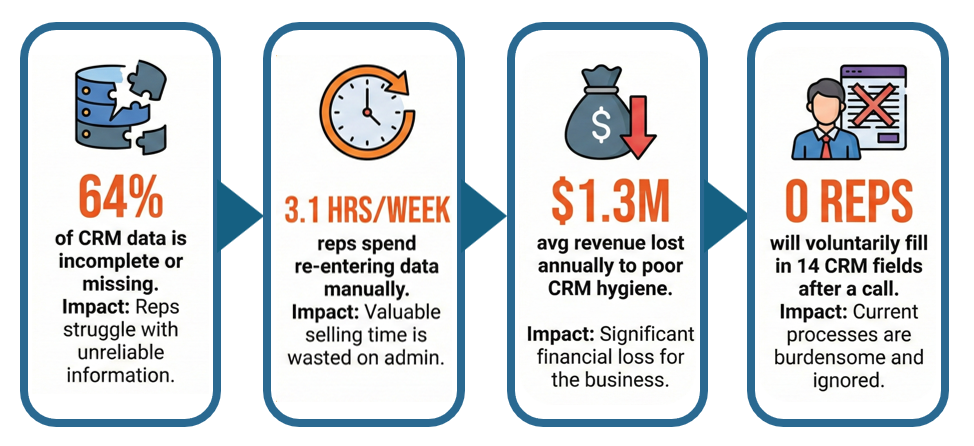
I want to be clear about that, because the instinct in most organizations is to respond to bad CRM data with a training initiative, a new required field, or a reminder from sales leadership about data hygiene. Those responses treat the symptom. They don't touch the cause.
The cause is a design problem. You've built a system that requires humans to do a machine's job: context-switch from a high-energy, high-attention conversation into structured data entry, under time pressure, with three more calls on the calendar. The gap between what was said and what got captured isn't a discipline problem. It's a timing problem. By the time the rep gets to the keyboard, the call is already fading. The next meeting is already loading.
The cost compounds quietly
Poor CRM data doesn't announce itself. It doesn't throw an error. It just silently degrades everything downstream from it.
Your pipeline forecast is built on opportunity records. If those records don't reflect what was actually discussed on calls, your forecast isn't a model of your pipeline. It's a model of what got entered. Those are not the same thing, and the gap between them tends to grow as deal complexity increases.
Your sales managers coach from activity records. If the activity record says "good call, following up," there's nothing to coach from. You can't see what objections came up, how the rep handled the budget conversation, or whether the timeline discussion was specific or vague. Coaching from that record is coaching from intuition, not evidence.
Your delivery team scopes work based on what they know going into a kickoff. If the deal closed with "needs CRM integration" in the notes and nothing else, your team finds out about the SAP dependency, the legacy data model, and the custom approval workflow in the discovery call that should have happened before the contract was signed. That's scope creep. That's the gap between what was sold and what was scoped. And it happens not because sales didn't know — they were on the call — but because what they knew didn't make it into the record.
There is a buildable fix
Here's what I'm not going to tell you: that AI is magic, that this is a one-click solution, or that you can skip the architecture. I've been in enough sessions that promise transformation in twenty minutes. That's not this series.
What I will tell you is that there is a practical path, using tools that are already available in your Microsoft Power Platform environment, to close this gap systematically. AI Builder and Power Automate. No new vendors. No custom model training. No machine learning team. A structured approach to prompt engineering, and a flow that reads the transcript and writes to the record.
Not perfectly. Not overnight. But reliably enough to be worth building, and incrementally enough to validate before you scale.
Over the next seven posts, I'll walk through the complete picture:
Post 2 covers the core capability: why you don't need to train a model to do this, and how zero-shot extraction works in practice.
Post 3 gets into prompt taxonomy. Most AI Builder demos at conferences use the wrong type of prompt for automation. That distinction matters more than most people realize, and it explains why so many first attempts break in production.
Post 4 is the architecture deep-dive: a five-layer prompt structure, each layer preventing a specific failure mode.
Post 5 addresses hallucination directly: what it looks like in a CRM context, why it happens, and why behavioral guardrails are a design decision, not a workaround.
Post 6 is the practical build guide. One field, five transcripts, this week.
Post 7 reframes the entire series from the business case angle, written for the person who needs budget approval rather than the person who builds the flow.
Post 8 is the evergreen anchor: a complete reference guide that links the full series.
This series is a written extension of a conference session I've been delivering called "From Talk to Tables: Turning Transcripts into Data." If you've seen the session, this goes deeper. If you haven't, you're starting in the right place.
Follow along. The next post covers why the model already knows what a pain point is, and why that changes what's actually possible without a data science team.
Let's get into it.